9800 WLC IOS Upgradation
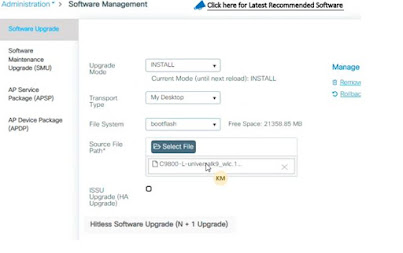
IOS Upgradation (9800 WLC ) Below Process from GUI: Go to Administration >> Software Management: Transport Method: HTTP, TFTP, FTP (In below snapshot, we have defined from local FE desktop and upgrade the image accordingly) Upload file to the Controller (Required IOS Image Select ) Once the image uploaded to controller, Now we can initiate download and Install the packaged to the controller (Also you can see the progress/Status on the right hand side where it defines the status ) At last, It gives you the option of Save Configuration and Reload of the Controller to makes the effect of new image. Note: For 17.4 and later releases, If you don't click on Commit the auto-timer terminates the upgrade operation after 6 hours and the controller reverts back to the previous image. Below Process from CLI: Copy the image from TFTP, USB, FTP, SCP, etc. to the controller memory. copy tftp://<sever-ip>/<.bin file> bootflash: Add the image to ...

